Framer is the ideal choice if you're looking for a quick, design-focused marketing website that is easy to edit without coding. Choose Webflow if your site requires a more robust CMS, complex functionality, extensive animation or a more serious content and SEO strategy.
They are both full-fledged and ready-to-use platforms, so it's not so much a question of "can you build a site here?" as it is "which platform does your team prefer to work with?
We've worked with both at Exponetly, and we're a Webflow Certified Partner and Framer Official Partner, so we know where each platform excels and where it falls short. In this guide, we'll explore each tool's mind, what each does well, how much each will cost after the price hike in May/26 and, at the end, a 2-question matrix so you can make your decision in less than 60 seconds.
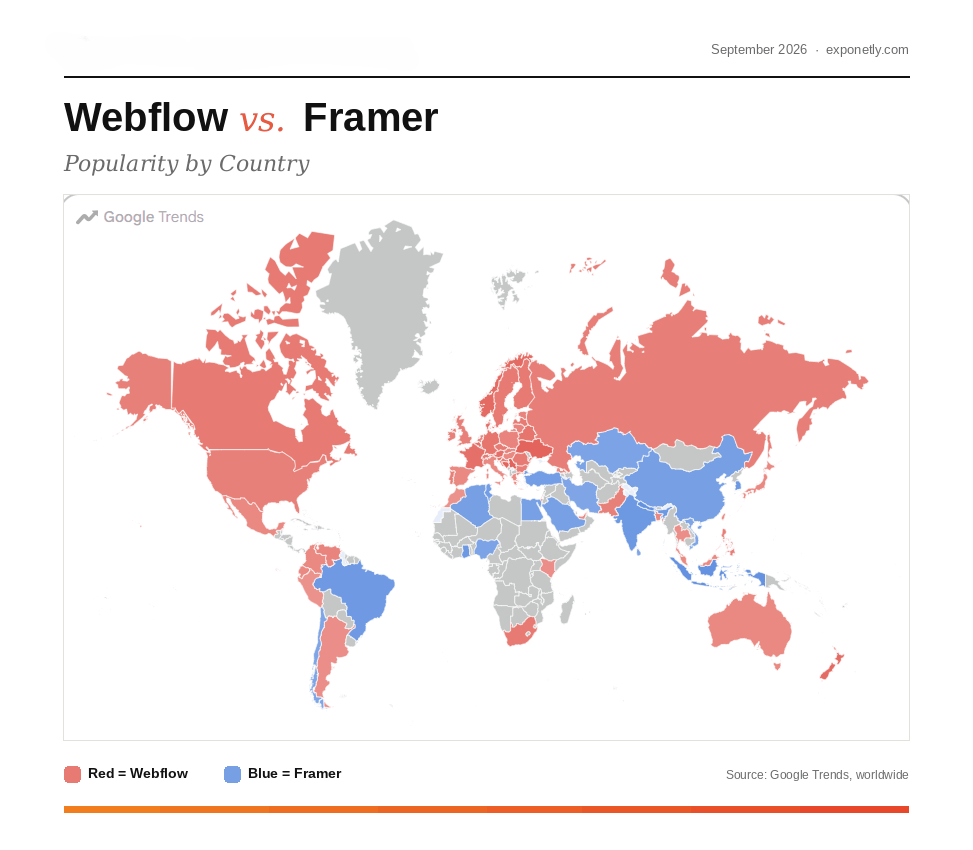
Choose Framer if you are a designer, work in Figma and layers, value for delivery speed and typically create blogs, light or marketing sites, or portfolios.
Choose Webflow if you're OK with thinking like a developer (classes, flexbox, grid), if you need some complex functionality or heavy animation, or if you're going to undertake a serious content and SEO program.
Most comparisons start with features. The actual difference is the mindset, as that determines who in your team will be building and maintaining the site.
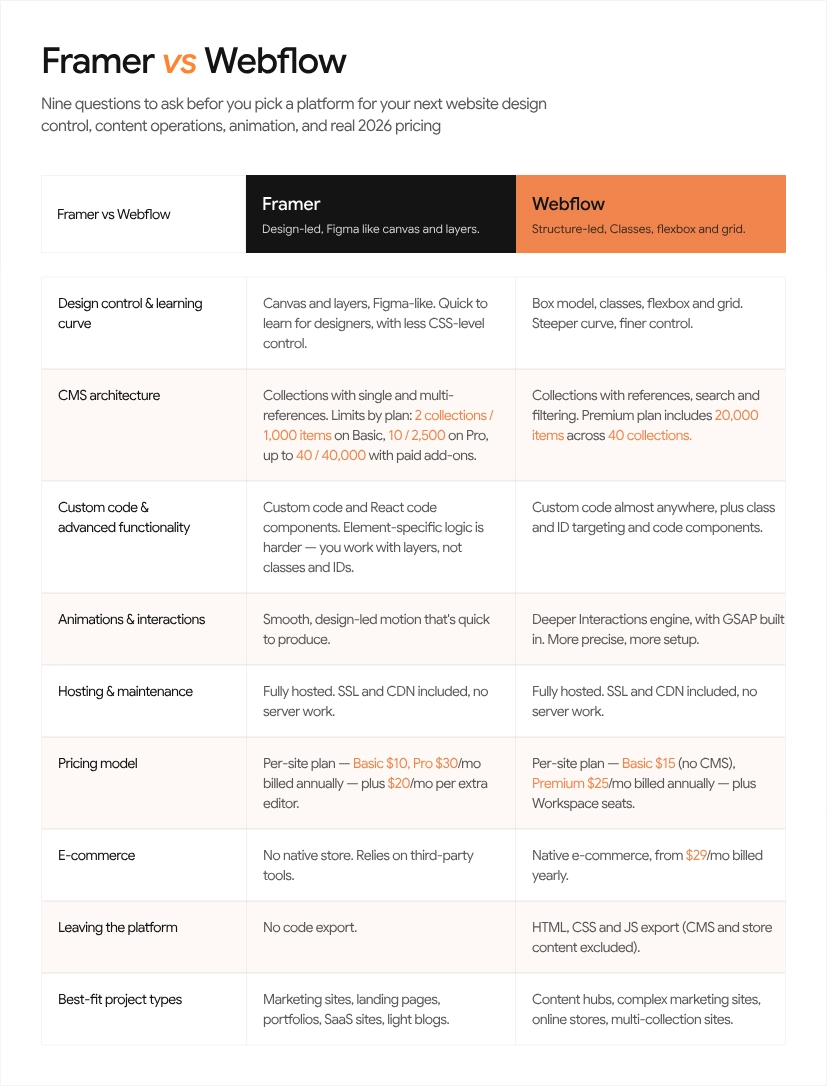
The Webflow platform will enable you to do “anything code can do” without coding. You add divs and classes, and use real CSS concepts: flexbox, grid, margins, padding, even some out of the way properties. If a button doesn't exist for a CSS property, you can create a custom button. There is a learning curve associated with that power, however, since you're supposed to be learning to think like a front end developer.
Framer has been designed for designers. It has no class system to manage and functions like Figma, with a canvas, layers and stacks. You create and share designs in the same stream - Framer generates the code below.
Why this matters: This is important to understand as Webflow is intuitive for engineers and logical thinkers who approach problems first from the perspective of structure. Creatives and non-technical people find Framer to be easier and more fun. Neither is "better." It is just that one will feel less resistance to fighting the tool.
The gap isn't "can it rank?" Both can. The gap is how easily you can operate complex sites and content at scale, and how much control you keep when the site outgrows its first version.
The useful way to look at this is that there are two types of locations where this is really important.
In Webflow, you can hook your custom code to specific elements using classes and IDs. This makes complex logic, custom scripts and integration easier to design and support.
Framer also has custom code support, but note that you'll have to do some work with element-specific logic since you don't have classes, but layers instead, and the element ID.
Webflow features a more powerful animation engine. It acquired GSAP, the industry standard JavaScript animation library in fall of 2024 and subsequently opened it to all for free, including plugins, which were previously a paid product. This is important for complex timelines and scroll-based interactions.
Smooth, design-driven motion is the forte of Framer, and with its swiftness, you get there quickly. The divide in 2026 is succinctly captured by this quote: “Framer makes advanced animation easy, Webflow makes it precise”.
When you require a beautifully animated site in a handful of days, Framer will not be difficult to beat. When working with a complex sequence at the frame level, Webflow is the winner.
There is one caveat here: GSAP is free now and can therefore be also loaded onto a Framer site with custom code as well. What Webflow has going for it is that it's really deeply integrated into the editor.
According to a prominent web design teacher (Flux Academy), 70-80% of websites could be created as well with either tool. We believe this is a good guideline. If your project is in that intersection, then do not agonize over features. Based on the people using the tool, the cost of the tool, and the amount of content that you will add in the future. Webflow typically triumphs for the remaining 20% (very tricky logic or complex animations).
The both platforms come with a strong CMS for regular websites. There is one thing to fix before reading older comparisons to Framer: That Framer is indeed capable of supporting relational content. In 2024 it has added collection references (single and multi-reference) to its CMS, enabling the linking between authors, categories and tags across collections.
The truth of today's real line is scale and structure and not "Framer can't do relationships. It all depends on your plan limitations and the number of content operations you will be operating.
Framer CMS is a great choice for blogs, portfolios, and basic case study libraries. Basic provides 2 collections with 1,000 items, Pro provides 10 collections with 2,500 items and add-ons add 40 collections and 40,000 items.
For structured content at scale, Webflow CMS reigns. The Premium plan now has 40 collections and 20,000 items since the price update in May 2026. Make sure to be aware: Webflow's Basic plan does not offer a CMS at all, which means a blog is Premium.
Threshold box Framer is usually fine when: you have 1 to 2 collections (say, a blog plus case studies), a few hundred to a couple of thousand items, and a small team publishing. Lean Webflow when: you need more than 10 collections, thousands of items, several linked content types (authors, categories, resources, locations, glossary), e-commerce, or many non-designers publishing regularly.
Both can rank for SEO. Exponetly, one of the agencies focusing on Webflow, has audited 50 sites that were published from January to June 2026, and found half of them to be built on Webflow. It found the Webflow average mobile PageSpeed SEO scores to be at 94, while the Framer is at 89. Take all of that with a grain of salt since that's coming from a Webflow expert, but it aligns with the general premise that Webflow provides more granular control of SEO for long-term content initiatives.
Framer and Webflow are SaaS solutions. No server to manage and all hosting, SSL and CDN delivery is provided. It's a huge plus for most business owners and agencies that despise maintenance.
If it's WordPress as well you're in a different ballgame. WordPress offers greater flexibility, and it's the best choice for extremely large, content-rich, and/or highly custom websites. However, you own the hosting, security, updates, and plugin maintenance – or you pay another business to. (If you choose to go that route, that's what our WordPress development service covers.)
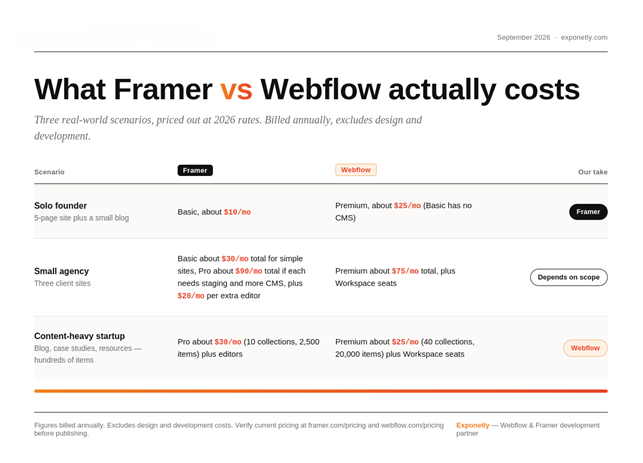
Many of the older comparisons are outdated, as both platforms altered their pricing in May 2026.
Webflow integrated its CMS and Business plans into one Premium plan for $39 per month (billed annually at $25 per month) and its Basic plan, which costs $15 per month (billed annually), doesn't have any CMS.
Framer lowered its extra editor seats from $25/month to $20/month (billed annually), and increased the bandwidth of its Basic tier from 10 GB to 50 GB, as well as adding 2 CMS collections, but did not reduce its monthly tiers (Basic is $10, Pro is $30, billed annually).
These days, "Framer is cheaper" only applies to entry level. Once you require a real business location with a CMS, the two are close.
All figures are paid on an annual basis and do not take into account design and development fees, which are typically much higher than the platform fee. These changes are for those on an older Webflow plan, and will affect next renewal (for Webflow sites in Freelancer/ Agency Workspaces, on or after 16 November 2026).
Framer is for designers and teams who want beautiful sites as quick as possible, as little code as possible, and as easy to use as Figma. Ideal for SaaS marketing sites, portfolios, campaign pages and anything you want to get your hands dirty with.
Webflow is the best platform for designers and teams who want to have pro-level control, a scalable CMS, complex interactions, and are not afraid of a learning curve. It's a better option when the site will be a content engine or a store.
WordPress is worth a mention if you're going for very complex or content-rich sites and are willing to accept the maintenance burden and have full stack freedom.
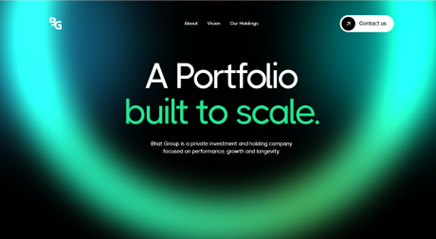
In our own work: We created TrackFlo, a SaaS marketing site on Framer and Bhat Group, a private investment and holding company site on Webflow.
See it in action: TrackFlo on Framer Same tool, real stakes. Here's what "design-led and fast" actually looks like when it's not a marketing site, it's a customer's. Peek behind the pixels →
See it in action: Bhat Group on Webflow When the client manages other people's money, "looks decent" doesn't cut it. Here's the Webflow build that had to earn trust before it earned a click. See how we built it →
If you've read this far and still can't call it, don't worry. Most people can't, on the first pass, because "which platform is better" is the wrong question. The right one is "which platform is better for me, right now, building this." Here are three lenses. Use the one that matches how you naturally make decisions.
This is the lens we trust the most, honestly, because it's the one that decides whether you'll actually enjoy building the site or fight it every step of the way.
If you think in layers, visuals, and "move this a bit to the left," you're a Framer person. You want to see the thing you're building, not the code behind it. That's not a lesser way to work. It's how most designers think, and Framer was built for exactly that.
If you think in structure, in divs and classes, in "this needs to sit inside that container," you're a Webflow person. You're comfortable with a bit of logic before you get to the visuals. Give you an hour with Webflow's class system and you'll start to see the whole page as a set of relationships, not just shapes on a canvas.
Neither type is more "technical" or more "creative" than the other. They're just different starting points, and picking the tool that matches yours is the single biggest thing you can do to avoid burnout on your own project.
Sometimes the person doesn't matter as much as the project. A few honest patterns:
If your project is a straightforward marketing site, this lens alone might settle it. If it's more ambitious, keep reading.
This is the one people skip, and it's the one that causes the most regret later.
If speed and design iteration matter most right now, Framer will get you live fast, and you can keep tweaking without much friction.
But if you know, even loosely, that content, SEO, AEO, or commerce are going to be a real growth channel for you over the next year or two, that changes the math. Webflow has been building AEO tooling directly into its higher-tier plans, which is worth paying attention to if AI search is part of your long-term plan and not just an afterthought. Starting there instead of migrating later can save you a rebuild down the road.
Question 1: Who will build and maintain the site?
Question 2: What will the site's job be over the next 12 to 24 months?
For speed and intuition, opt for Framer. If you're looking for power and scale, you should go with Webflow. Many will find the easiest way is to test them both for a week and see which one feels more natural to them, and compare it to the contents plans for the next two years.
Already registered on a platform and thinking of making a switch? There's no one-click conversion. The structure is rebuilt, and all the content is re-imported, where a migration partner makes his/her money. Check our No-Code web development.
Don't know which one is right for your project? That's a conversation we have all the time. Based on your goals, not a template, we will recommend the best design to you from our team of Webflow and Framer designer and developers. Write us a little about your project and we will help you get started.
1. Is Framer easier than Webflow for designers?
Yes, for most designers. Framer works like Figma, with a canvas, layers, and stacks, so you can design and publish in one flow. Webflow asks you to think in HTML structure and CSS classes, which takes longer to learn but gives finer control. People with an engineering mindset often find Webflow natural; creatives usually pick up Framer faster.
2. Can I build complex functionality in Framer?
Yes, to a point. Framer supports custom code and React code components, so many integrations work fine. The catch is that you work with layers rather than classes and element IDs, which makes element-specific logic harder than in Webflow. For advanced logic, gated content, or heavy custom scripting, Webflow is usually the smoother path.
3. Which is better for animation-heavy sites?
Webflow, if the animations are complex and timeline-based. It has a mature Interactions engine and has been integrating GSAP, the animation library it acquired in 2024. Framer is excellent for smooth, design-led motion and gets you there faster, but very intricate, code-like animation systems are easier to control in Webflow.
4. Is Framer CMS enough for a serious blog?
For a small to mid-size blog, yes. Framer's CMS supports collection references and multi-references, so authors and categories work. On the Pro plan you get 10 collections and 2,500 items. If you plan thousands of posts, many content types, or a large editorial team, Webflow's Premium limits of 20,000 items and 40 collections give more headroom.
5. Should I learn both Framer and Webflow?
If you build sites professionally, yes. Most sites can be built on either tool, but the hardest 20% usually points to Webflow. Start with the one that matches how you think, then learn the second when a project demands it. Or try both free plans for a week and go with the one that feels natural.